
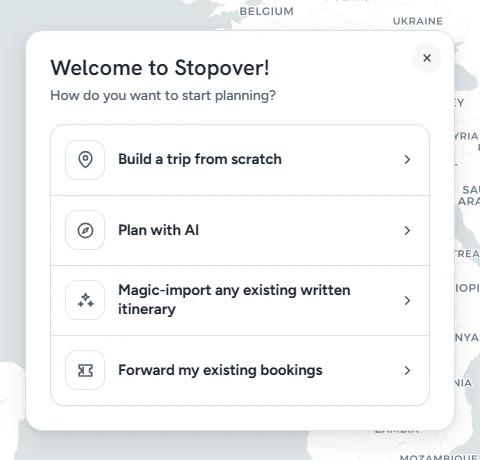
Open the planner on a new trip and Stopover asks one question: How do you want to start planning? There are four answers, and they all end in the same place, a trip on the map that you can change, price and book.
Which one to pick
| You have | Choose | What happens |
|---|---|---|
| A destination or two in mind | Build a trip from scratch | You add cities yourself and Stopover connects them. |
| An idea, but no route | Plan with AI | You describe the trip and the assistant drafts a route for you. |
| An itinerary already written | Magic-import any existing written itinerary | You paste it and Stopover builds it as written. |
| Flights or hotels already booked | Forward my existing bookings | You forward the confirmation emails and they land on the trip. |
Build a trip from scratch
Type your first destination in Where to?, then keep adding cities. Each one gets its own nights, a hotel slot and things to do. Rows between cities are where flights, trains and drives go. Build your first trip in five minutes walks through it.
Plan with AI
Describe the trip in a sentence or two, such as "10 days in Japan in spring for two, food and design, not too rushed". Say where you're flying from and roughly when. The assistant drafts a route, shows it on the map, and builds it with real flights and hotels when you're happy. See Plan a trip with AI.
Magic Import
Paste a plan from ChatGPT, a blog, an email or your own notes. Stopover tells you the trip it's planning and builds it right away, with the same stops, dates and named hotels. See Magic Import: bring in an itinerary you already have.
Forward your bookings
Already booked? Forward your confirmation emails to add@stopover.travel with the trip's code in the subject, and the flights, hotels and trains are added to the trip. See Forward your bookings to a trip.
You can mix them
The four ways are starting points. Import an itinerary, then forward the two bookings you've already made. Start from scratch, then ask the assistant to fill in the hotels. Everything lands in the same planner.
Starting another trip later
Click the trip's name at the top and choose + New. You get the same four choices.