
Paste an itinerary from ChatGPT, Claude or Gemini into Stopover's Magic Import. It maps the route, adds real flights and hotels with live prices, and keeps every stop and date you were given.
ChatGPT is good at the first draft of a trip. Ask for two weeks in Europe and you get a sensible list: London, Paris, Zurich, Venice, Rome, three nights here, two there.
Then you are left holding a block of text. It has no map. The flights are examples, the hotel prices are guesses, and nothing in it can be booked.
Stopover's Magic Import takes that text and turns it into a trip you can check, change and book.
Quick answer
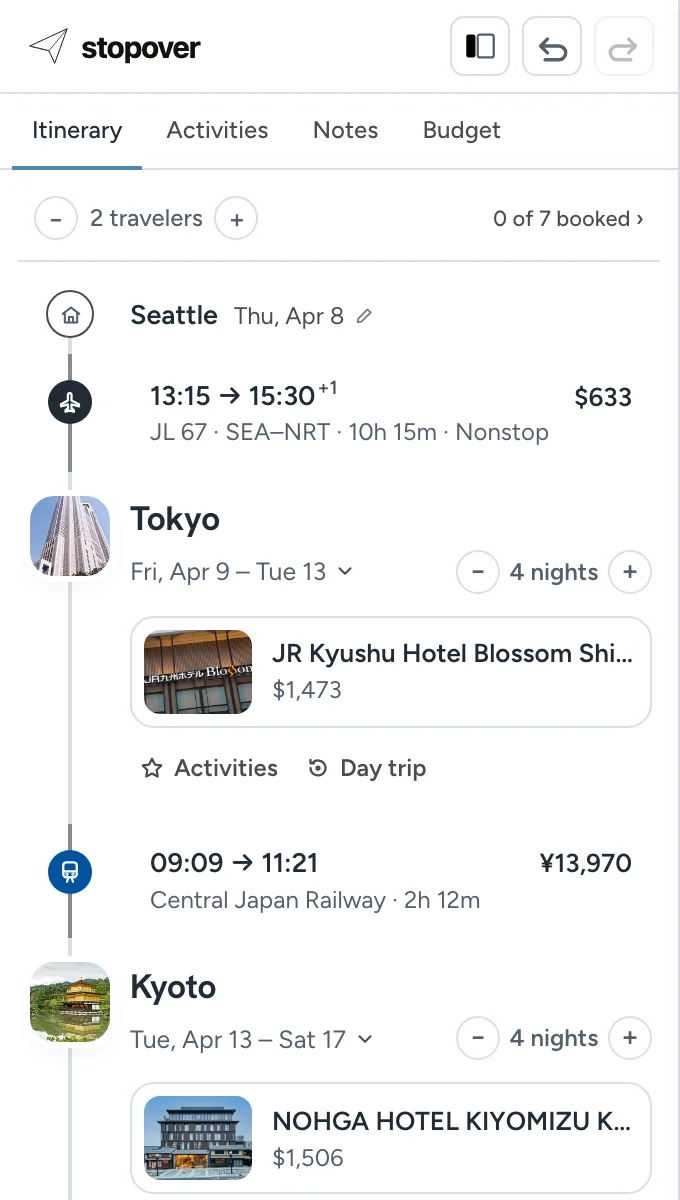
Open Magic Import and paste the itinerary. Stopover reads it, tells you the trip it's planning and builds it right away: every stop on a map in the order you were given, connected by flights, trains or drives. Where the plan left a flight or hotel open, it adds a real one with a live price.
| You have | What Stopover does with it |
|---|---|
| A day-by-day plan from ChatGPT, Claude or Gemini | Builds the route on a map with the same stops, order, dates and nights |
| "Fly from Rome to Athens" with no flight named | Searches live flights for that day and picks one you can change |
| "Stay near the old town" with no hotel named | Suggests real hotels for those dates at the current price |
| A hotel or flight number you already chose | Keeps it as written |
| Bookings you already made | Marks them as booked and keeps the confirmation number |
How to do it
- Copy the whole itinerary from your AI chat. Include your dates and where you are flying from if you know them.
- Open Magic Import, or paste it to Gerald (in the corner of the map, or at the bottom right of your trip on a phone).
- Paste the itinerary and send it. Stopover tells you the trip it's planning and builds it right away: it draws the route and searches flights, trains and hotels for your dates. If it needs something first, such as where you're flying from, it asks.
- When it says Your trip is ready, the trip is in your itinerary: flights, hotels and trains with live prices. Budget adds up the total.
- Change anything. Click a flight, train or hotel to pick a different one, or type what you want in Ask for a change…, such as "swap the Florence hotel for one near the station".
- Book the hotels with Book with Stopover when you are ready.
You can try it without an account. Sign in (it's free) to keep the trip. If something doesn't come out right, Magic Import: bring in an itinerary you already have has the troubleshooting.
What it keeps and what it fills in
Magic Import is built to preserve your plan.
It keeps every destination, the order, the dates, the number of nights, the activities, and any hotel, airline or flight number the itinerary names. It will not drop a city or add one because another route looks better.
It fills in only what the itinerary left open. A night in a city needs somewhere to stay, and two cities in a row need a way to get between them. Those gaps are filled from live flight and hotel searches, so every option shown exists and has a real price for your dates.
A hotel you named stays on the trip. When Stopover finds it in live results, you get its price and can book it. When it can't, the hotel is kept by name, without a price, and you can look for it yourself or pick another.
What to check after importing
AI itineraries often look fine as text and fall apart on a map. Three things show up fast once the route is drawn:
- Backtracking. A route that crosses the same ground twice is obvious as a line and invisible in a list.
- Travel days that eat the trip. A seven-hour train between two "easy" stops is a day gone. Each leg shows how long it really takes.
- Prices that miss the budget the AI gave you. Flight and hotel prices are live, so the total is what the trip costs today.
Limits
- One import builds a route of up to 6 overnight stops. Add more cities by hand afterwards.
- It reads text. Paste the words, not a screenshot.
- Flights and hotels show live prices. Train and bus legs show times, and the fare when it's known. Drives show time and distance.
- Dates more than about 10 months away may not have flights or hotel prices yet.
- Without an account you get a few imports a day. Signing in raises the limit.
FAQ
Can I put a ChatGPT itinerary on a map?
Yes. Paste it into Magic Import and each stop is placed on a map in order, with the travel between stops drawn as flights, trains or drives.
Does it work with Claude and Gemini itineraries?
Yes. Magic Import reads plain text, so it does not matter which assistant wrote it. It also reads a plan from a blog, one you wrote yourself, or booking details from an email.
Will it change my itinerary?
No. It keeps the stops, order, dates and any hotels or flights you named. It only adds what is missing, such as a hotel for a night that has none.
Are the prices real?
Yes. Flight and hotel prices come from live searches for your dates.
Can I book from the imported trip?
You can book hotels inside Stopover. Flights are booked with the airline, or wherever you find the best fare. Add the confirmation number and Stopover marks the flight as booked.
Is it free?
Yes. Stopover is free to plan with, and you can try Magic Import without an account.