
Plan with AI turns a sentence into a trip. You describe what you want, the assistant drafts a route and shows it on the map, and when you like it, Stopover builds it with real flights, trains and hotels for your dates.
Describe the trip
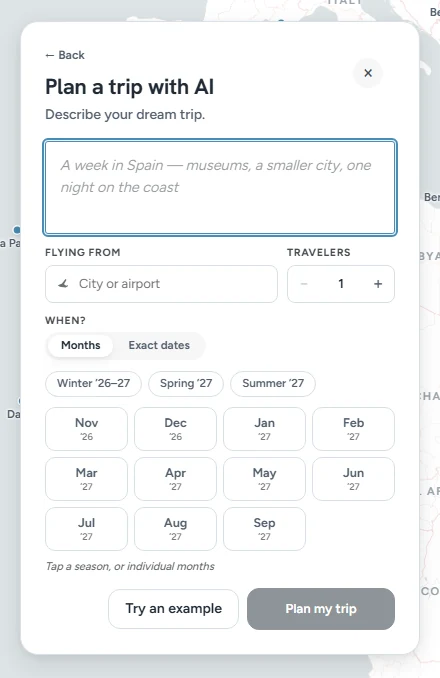
Choose Plan with AI when you start a new trip. Then fill in:
- Describe your dream trip. A sentence or two is enough: "A week in Spain, museums, a smaller city, one night on the coast."
- Flying from. Your city or airport.
- Travelers. How many of you are going.
- When? Tap a season or a few months if you're flexible, or switch to Exact dates.
Not sure what to write? Try an example fills the box for you. Then click Plan my trip.
Look at the route
The assistant replies with a route: the places you'll stay overnight, in order, how many nights in each, and how you travel between them. The same route is drawn on the map.
If it needs something it can't safely guess, it asks. "Where are you flying from?" is the common one. Answer in the message box, or pick one of the options it offers.
Don't like the route? Say so in the same box. "Slower, fewer stops." "Swap Porto for the Douro Valley." "Make it 12 days." Each new route replaces the one on the map, and the earlier ones stay a tap away in the conversation.
Build it
Click Build this trip. Stopover draws the route into your itinerary and searches flights, trains and hotels for your dates. When it says Your trip is ready, the trip is in your itinerary with its prices, and Budget adds up the total.
From there the trip is yours. Change anything by hand, or keep typing in Ask for a change…. See Ask for a change: edit your trip by asking.
What it won't do
- It doesn't book anything. Hotels are booked when you choose Book with Stopover, and flights are booked with the airline.
- It doesn't change anything you've marked as booked.
- It plans routes of up to 6 overnight stops. Add more cities by hand afterwards.
Limits
Without an account you get a few AI plans a day. Signing in (it's free) raises the limit and saves the trip.
FAQ
Are the flights and hotels real?
Yes. The route is the assistant's idea, but the flights, trains and hotels come from live searches for your dates, with real prices.
Can I start with AI and finish by hand?
Yes. A trip built by Plan with AI is a normal Stopover trip. Every city, flight and hotel can be changed the usual way.
Can I reopen the conversation later?
Yes. Click Gerald (in the corner of the map, or at the bottom right of your trip on a phone).