
Many hotels in Stopover can be booked right in the planner. You pick the room, pay on a secure form, and the booking is saved to your trip.
Where booking starts
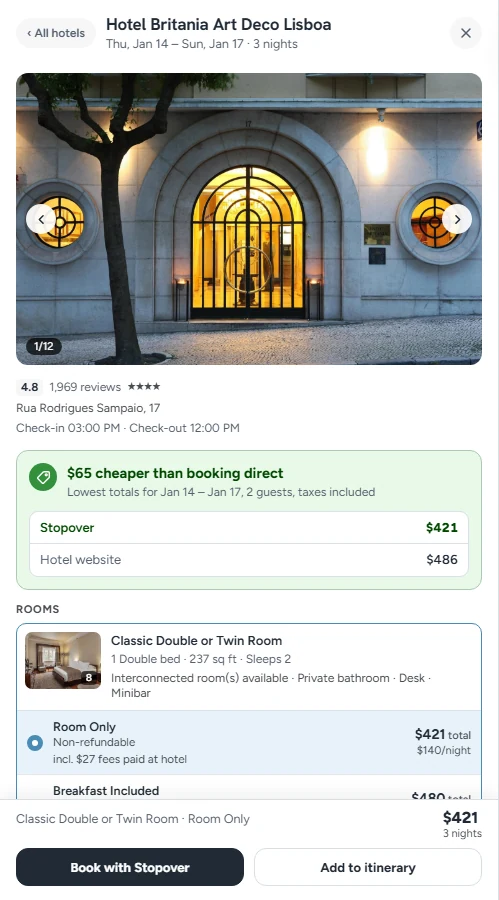
You'll see Book with Stopover in a few places:
- in the hotel panel, on a hotel you've opened and the room you've picked
- on the hotel's own page (Hotel details), for the room you select
- in the Bookings checklist, which opens from the booked count at the top of the itinerary
Add to itinerary is the other button. It saves the hotel to your trip without booking anything.
Pick the room
Open a hotel to see its photos and rooms. Each room shows:
- the total for your stay and the price per night
- the bed, size and how many it sleeps
- the meal plan, such as Room Only or Breakfast included
- the cancellation terms: Non-refundable, or Free cancellation until a date
Checkout
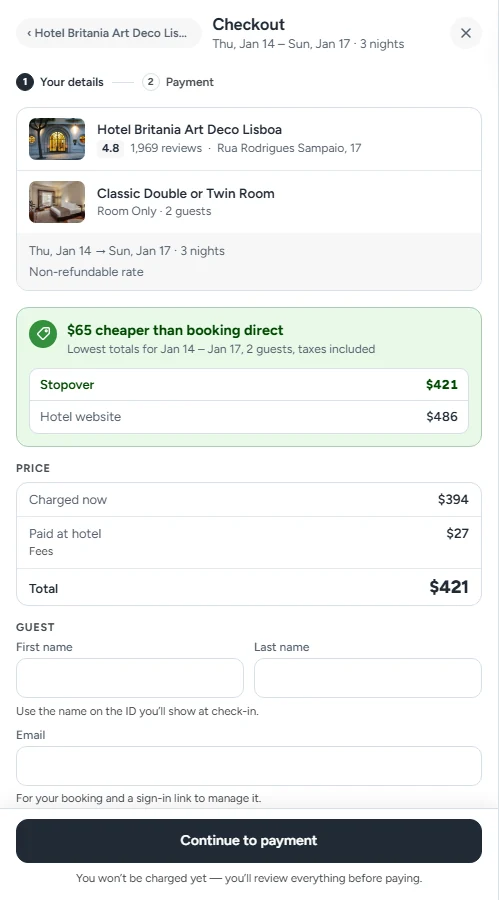
Checkout has two steps: Your details, then Payment.
Your details
- First name and Last name. Use the name on the ID you'll show at check-in.
- Email. It's used for your booking and for a sign-in link to manage it.
- Have a promo code? Enter it here. If the code covers the whole stay, there's nothing to pay and no card is needed.
Click Continue to payment. You won't be charged yet. You review everything before paying.
Payment
Card details go straight to our booking partner's secure payment form, and payments are processed by Stripe. The button shows the exact amount, such as Pay $394.
What you pay now and what you pay at the hotel
The price block separates the two:
- Charged now is what your card pays today.
- Paid at hotel is anything the hotel collects itself, usually a city tax or a resort fee.
- Total is both together.
Totals include taxes and fees. Where a city tax is an estimate, it says so.
If something changed
Rates move. If the meal plan, the cancellation terms or the price changed since you opened the hotel, checkout shows you what changed before you pay. If the room is gone, you'll see This room is no longer available and a link to the current rooms.
After you book
- The hotel is saved to your trip and marked as booked.
- You get a confirmation email with the dates, address, guests, what you paid and the cancellation policy.
- The booking appears in My bookings, in the account menu at the top right.
Changing or cancelling a booking
Open My bookings and choose the booking. You'll see its confirmation numbers, payment status and Cancellation policy:
- Free cancellation until a date means you can cancel without a fee before then.
- Non-refundable rate means the stay can't be refunded.
Click Cancel booking to cancel. The final refund and any fee are confirmed by our booking partner after cancellation.
FAQ
Do I need an account to book?
No. Enter your email at checkout and we'll send you a sign-in link to manage the booking.
Can every hotel be booked in Stopover?
No. When a room can't be booked through Stopover, you can still add the hotel to your itinerary and book it elsewhere, then mark it as booked.
Who do I contact about a booking?
Email hello@stopover.travel.