
Build a multi-stop trip on one map. Search flights as one-way, round-trip or multi-city tickets, add trains and drives, compare hotels with live prices and book them, and see what the whole trip costs.
A trip with one destination needs a flight search and a hotel search. A trip with five destinations needs more, because every choice moves the others. An extra night in Rome changes the train to Florence, the hotel dates in Florence, and the flight home.
Stopover is a planner built for that kind of trip. The whole route sits on one map, and the flights, trains and hotels are searched for the dates the route gives them.
Quick answer
| What you need | How Stopover handles it |
|---|---|
| See the whole route | Every city on one map, with an itinerary beside it listing the nights and the travel between stops |
| Flights between stops | Live search. Flights you tick together are priced as one ticket: one way, round trip or multi-city |
| Trains, buses and drives | Scheduled trains and buses with times and operator. Drives with time and distance |
| Hotels | Live rates for each city's exact nights, shown as price pins on the map. Many rooms can be booked inside Stopover |
| The total | Flights, hotels, train fares and activities add up as you build |
| Changes | Add a night or reorder cities and the dates after it update. Anything that no longer fits is flagged with a Fix |
Start with the route
Type your first destination, then keep adding cities. Each city has its own nights, and a plus and minus to change them. Drag a city to reorder the route. Stopover fits each change in and updates the dates after it.
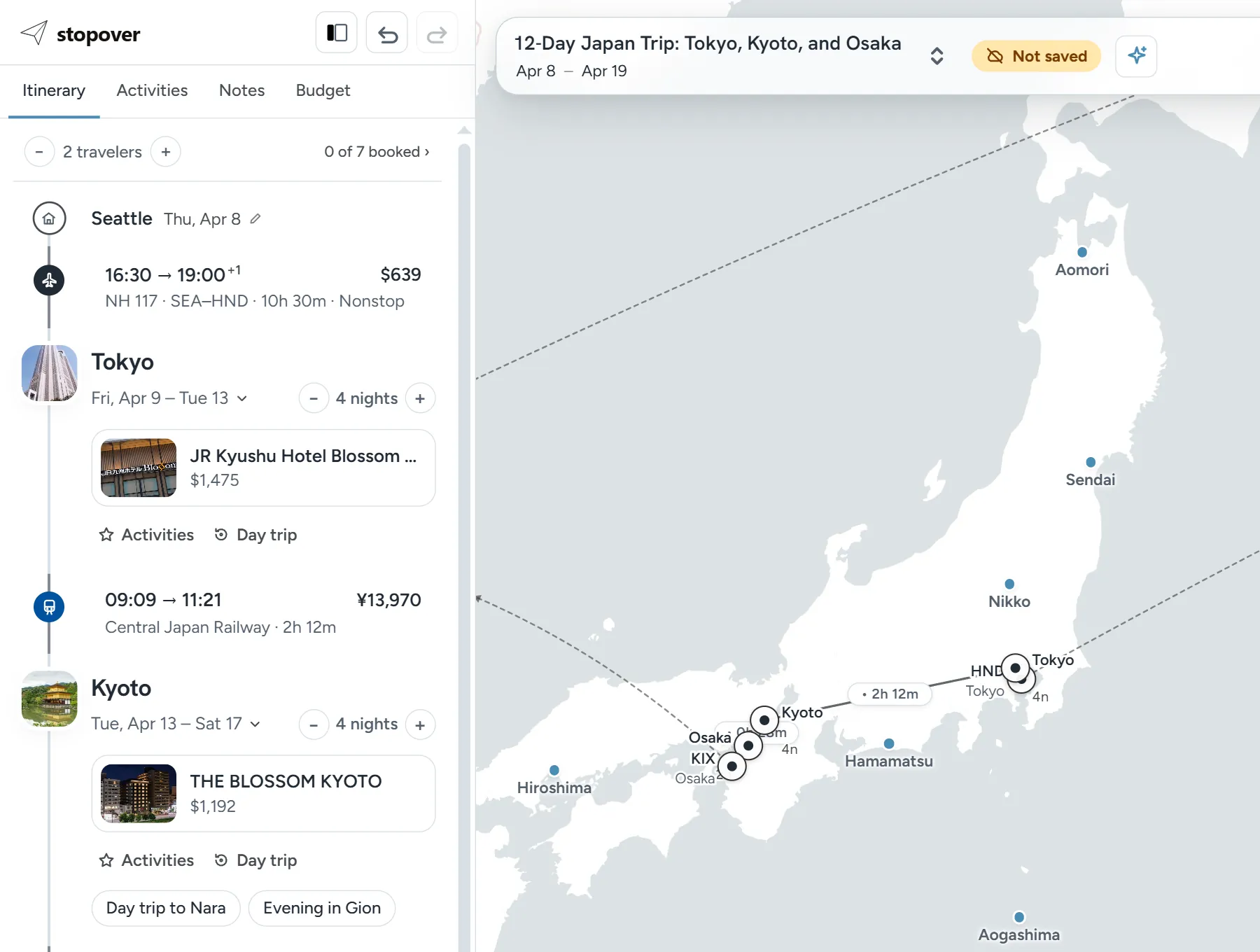
You don't have to start from a blank map. Plan with AI drafts a route from a description, such as "10 days in Japan in spring for two". Magic Import builds the route from an itinerary you already have, from an AI chat or your own notes. See How to turn a ChatGPT itinerary into a real trip.
Flights, priced the way you'd buy them
Every gap on the route is a row. Click one to search flights. At the top of the search is your ticket: the flights that are ticked get searched together, as one booking. One flight is a one-way. Out and back between the same airports is a round trip. Anything else is a multi-city ticket.
Results show times, airline, stops, layovers and price, with a price insight that tells you whether today's fare is low or high for the route. If you book with miles, connect a seats.aero account and compare award seats against cash prices on the same trip.
Trains, buses and drives
Short hops suggest a train, bus or drive. Train and bus results are scheduled routes, with times, operator, duration, transfers, and the fare when it's known. The Drive tab shows driving time and distance, and works out when you'll arrive.
They sit on the route next to your flights, so the whole journey reads in one place.
Hotels for the exact nights
Each city has a hotel slot. Open it and Stopover searches live rates for that city's dates. Filter by price, rating, star class or free cancellation. Open a hotel to see its rooms, each with its meal plan, cancellation terms and total price.
Change a city's nights and the hotel's dates move with it.
What the trip costs
The Budget tab totals flights, hotels, train and bus fares, and activities automatically. Flight and train fares are multiplied by the number of travelers, and hotels are priced per room. Prices stay in the currency they were quoted in.
Driving costs are not added for you. Put fuel, tolls or a rental car in the Ground transit row, along with food and anything else.
Booking
Many hotel rooms can be booked right in the planner with Book with Stopover. Flights are booked with the airline, or wherever you find the best fare. Add the confirmation number and the flight is marked as booked.
The top of the itinerary keeps count, such as "1 of 5 booked", so you can see what's left.
Planning with other people
Create a view-only link to show someone the trip, or invite up to 5 people to edit it with you.
Limits
- For a single round trip to one city, a flight search is enough. Stopover pays off once a trip has more than one stop.
- Flights are not booked inside Stopover.
- Airlines publish schedules about 330 days ahead. Beyond that, flight results are thin.
FAQ
What is the best way to plan a multi-city trip?
Settle the route first: which cities, in what order, and how many nights each. Then price the flights, trains and hotels for the dates that route creates. Stopover keeps both steps on one map, so a change to the route shows up in the prices straight away.
Can I book all the flights and hotels in one place?
You can book hotels inside Stopover. Flights are booked with the airline. Stopover holds the whole trip either way and shows what is booked and what is not.
Can I mix flights and trains on the same trip?
Yes. Every leg can be a flight, train, bus, ferry or drive, and they all show on the same route.
Is it free?
Yes. Stopover is free to plan with.